Introduction
DaWiQ is a Python package for generating Qt widget from the dataclass.
Here is a PySide6 example for widget construction.
from dataclasses import dataclass
from dawiq import dataclass2Widget
from PySide6.QtWidgets import QApplication
import sys

@dataclass
class DataClass:
    x: int
    y: bool

app = QApplication(sys.argv)
dataWidget = dataclass2Widget(DataClass)
dataWidget.show()
app.exec()
app.quit()
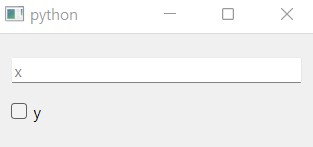
Appearance of dataWidget
For other Qt bindings, see the examples in User guide.
Supported field types
DaWiQ constructs the widget for each field by using its type hint. By default, the following types are supported:
Enum->EnumComboBoxbool->BoolCheckBoxOptional[bool]->BoolCheckBoxwith tristateintorOptional[int]->IntLineEditfloatorOptional[float]->FloatLineEditstrorOptional[str]->StrLineEditTuple->TupleGroupBoxwith nested field widgetsdataclass-> NestedDataWidget
How about other types?
Any other type can be supported by defining special metadata to the dataclass field:
Qt_typehint: type hint for widget constructiontoQt_converter: converts dataclass data to widget datafromQt_converter: converts widget data to dataclass data
For more information, see How to create dataclass widget and How to use item model.
Supported Qt bindings
DaWiQ is compatible with the following Qt binding packages:
When DaWiQ is imported, available package is searched and selected in the order mentioned above.
To force a particular API, set environment variable DAWIQ_QT_API with package name. Letter case does not matter.