Optional field and default value
For a dataclass field, two important questions arise:
It is
Optional?Does it have a default value?
from dataclasses import dataclass
from typing import Optional

@dataclass
class Dataclass:
    x: Optional[int] = 3
If the field type is Optional, None is allowed for placeholder object in addition to the main type.
For example, Optional[int] indicates that the field is normally an integer but None is allowed as well.
Note
In fact, Python does not perform type check and allows you to pass None to the field with just int.
However this shouldn’t be performed for robust typing.
If a field has default value, the field is not mandatory and one can omit its value where the default value is used instead.
Handling an empty field and a default value is a tricky problem for DaWiQ.
Should empty StrLineEdit indicate an empty string "", or should it represent None as an empty field?
If a widget is empty, should it be occupied with default value or not?
This document explains how DaWiQ deals with that problem.
Basic example
Here is a simple dataclass with different fields.
>>> import dataclasses
>>> from typing import Optional
>>> @dataclasses.dataclass
... class DataClass:
...     a: int
...     b: Optional[int]
...     c: int = 0
...     d: Optional[int] = None
>>> DataClass(1)
Traceback (most recent call last):
...
TypeError: __init__() missing 1 required positional argument: 'b'
>>> DataClass(1, None)
DataClass(a=1, b=None, c=0, d=None)
DataClass.a: cannot beNone, no defaultDataClass.b: can beNone, no defaultDataClass.c: cannot beNone, has defaultDataClass.d: can beNone, has default
How will the data widget from DataClass be?
from PySide6.QtGui import QStandardItemModel, QStandardItem
from PySide6.QtWidgets import QApplication
from dawiq import DataclassDelegate, DataclassMapper, dataclass2Widget
import sys

model = QStandardItemModel()
item = QStandardItem()
item.setData(DataClass, role=DataclassDelegate.TypeRole)
model.appendRow(item)

delegate = DataclassDelegate()
mapper = DataclassMapper()
mapper.setItemDelegate(delegate)
mapper.setModel(model)

app = QApplication(sys.argv)
app.setStyleSheet("*[requiresFieldValue=true]{border: 1px solid red}")

widget = dataclass2Widget(DataClass)
mapper.addMapping(widget, 0)
mapper.setCurrentIndex(0)

widget.show()
app.exec()
app.quit()
from PyQt6.QtGui import QStandardItemModel, QStandardItem
from PyQt6.QtWidgets import QApplication
from dawiq import DataclassDelegate, DataclassMapper, dataclass2Widget
import sys

model = QStandardItemModel()
item = QStandardItem()
item.setData(DataClass, role=DataclassDelegate.TypeRole)
model.appendRow(item)

delegate = DataclassDelegate()
mapper = DataclassMapper()
mapper.setItemDelegate(delegate)
mapper.setModel(model)

app = QApplication(sys.argv)
app.setStyleSheet("*[requiresFieldValue=true]{border: 1px solid red}")

widget = dataclass2Widget(DataClass)
mapper.addMapping(widget, 0)
mapper.setCurrentIndex(0)

widget.show()
app.exec()
app.quit()
from PySide2.QtGui import QStandardItemModel, QStandardItem
from PySide2.QtWidgets import QApplication
from dawiq import DataclassDelegate, DataclassMapper, dataclass2Widget
import sys

model = QStandardItemModel()
item = QStandardItem()
item.setData(DataClass, role=DataclassDelegate.TypeRole)
model.appendRow(item)

delegate = DataclassDelegate()
mapper = DataclassMapper()
mapper.setItemDelegate(delegate)
mapper.setModel(model)

app = QApplication(sys.argv)
app.setStyleSheet("*[requiresFieldValue=true]{border: 1px solid red}")

widget = dataclass2Widget(DataClass)
mapper.addMapping(widget, 0)
mapper.setCurrentIndex(0)

widget.show()
app.exec_()
app.quit()
from PyQt5.QtGui import QStandardItemModel, QStandardItem
from PyQt5.QtWidgets import QApplication
from dawiq import DataclassDelegate, DataclassMapper, dataclass2Widget
import sys

model = QStandardItemModel()
item = QStandardItem()
item.setData(DataClass, role=DataclassDelegate.TypeRole)
model.appendRow(item)

delegate = DataclassDelegate()
mapper = DataclassMapper()
mapper.setItemDelegate(delegate)
mapper.setModel(model)

app = QApplication(sys.argv)
app.setStyleSheet("*[requiresFieldValue=true]{border: 1px solid red}")

widget = dataclass2Widget(DataClass)
mapper.addMapping(widget, 0)
mapper.setCurrentIndex(0)

widget.show()
app.exec()
app.quit()
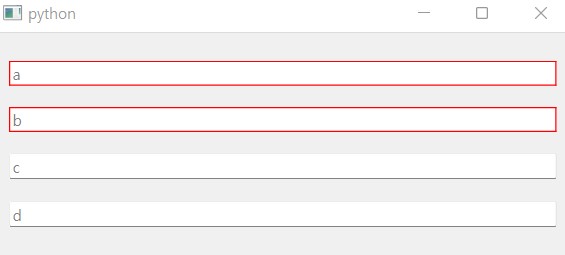
Widget from DataClass
Default values are not updated to the model, as explained in How to use item model. We can set the delegate to change this behavior, but we do not cover it here.
What will be the widget data and the model data?
>>> widget.dataValue()
{'a': None, 'b': None, 'c': None, 'd': None}
>>> item.data(role=DataclassDelegate.DataRole)
{}
Data values of all widgets are None, as None is designed to be.
When setting the widget data to the model data, the delegate ignores the field with None.
Therefore the model data is an empty dictionary.
Now let’s change the widget data to update the model data.
>>> widget.setDataValue(dict(a=3, b=4, d=5))
>>> mapper.submit()
>>> widget.dataValue()
{'a': 3, 'b': 4, 'c': None, 'd': 5}
>>> item.data(role=DataclassDelegate.DataRole)
{'a': 3, 'b': 4, 'd': 5}
Valid data (not None) in the field widget is updated to the model.
At this time it is easy to construct the dataclass instance from the model data.
>>> args = item.data(role=DataclassDelegate.DataRole)
>>> DataClass(**args)
DataClass(a=3, b=4, c=0, d=5)
We can see that DataClass.c does not exist in the model data so the dataclass constructor used the default value instead.
Limitation
Now if we want to set None to DataClass.d, we can just REMOVE the field widget data.
Then the field data in the model will be deleted and dataclass constructor will use the default value, which is None.
>>> widget.setDataValue(dict(a=3, b=4))
>>> mapper.submit()
>>> args = item.data(role=DataclassDelegate.DataRole)
>>> DataClass(**args)
DataClass(a=3, b=4, c=0, d=None)
But how can we set None to DataClass.b?
>>> widget.setDataValue(dict(a=3))
>>> mapper.submit()
>>> widget.dataValue()
{'a': 3, 'b': None, 'c': None, 'd': None}
>>> args = item.data(role=DataclassDelegate.DataRole)
>>> args
{'a': 3}
>>> DataClass(**args)
Traceback (most recent call last):
...
TypeError: __init__() missing 1 required positional argument: 'b'
Sadly, we can’t because None is reserved to indicate the empty widget value so it is not updated to the model at all.
Note
One way to introduce placeholder without encountering this issue is defining the dedicated sentinel (see dataclasses.MISSING).
However if we used it, user must import dawiq upon dataclass definition to filter the sentinel.
This is undesirable because we want to separate the core side and GUI side, so we bite the bullet and use None.
This is the limitation of DaWiQ, and in fact is an intended behavior.
Workaround
We can avoid this problem by using the widget data converter explained in How to use item model. Let’s redefine the dataclass as follows and run the GUI construction code in the basic example section above.
>>> import dataclasses
>>> from typing import Optional
>>> def fromQt_converter(string):
...     if not string:
...         return None
...     return int(string)
>>> def toQt_converter(obj):
...     if obj is None:
...         return ""
...     return str(obj)
>>> @dataclasses.dataclass
... class DataClass:
...     x: Optional[int] = dataclasses.field(metadata=dict(
...         Qt_typehint=str,
...         fromQt_converter=fromQt_converter,
...         toQt_converter=toQt_converter
...     ))
Since the data value of StrLineEdit is an empty string and never None, we can handle the empty string to return None.
>>> widget.dataValue()
{'x': ''}
>>> item.data(role=DataclassDelegate.DataRole)
{'x': None}
>>> args = item.data(role=DataclassDelegate.DataRole)
>>> DataClass(**args)
DataClass(x=None)
Setting the integer value is identical.
>>> widget.setDataValue(dict(x="2"))
>>> mapper.submit()
>>> widget.dataValue()
{'x': '2'}
>>> item.data(role=DataclassDelegate.DataRole)
{'x': 2}
>>> args = item.data(role=DataclassDelegate.DataRole)
>>> DataClass(**args)
DataClass(x=2)
Nested widgets
Nested field widgets such as TupleGroupBox never have None value.
>>> import dataclasses
>>> from typing import Tuple
>>> @dataclasses.dataclass
... class DataClass:
...     x: Tuple[int, int] = (10, 20)
>>> DataClass()
DataClass(x=(10, 20))
If we construct the widget and model using this dataclass, this is what we get from the empty editors.
>>> widget.dataValue()
{'x': (None, None)}
>>> args = item.data(role=DataclassDelegate.DataRole)
>>> args
{'x': (None, None)}
>>> DataClass(**args)
DataClass(x=(None, None))
(None, None) from the TupleGroupBox is updated to the model data, because only None is filtered from the field widget.
Therefore we cannot let DataClass use the default value.
Note
dawiq does not recursively check the subwidget values because doing so will cause tons of troubles.
Workaround
We can define __post_init__ method of the dataclass to replace None with the items of default value.
>>> import dataclasses
>>> from typing import Tuple, Optional
>>> @dataclasses.dataclass
... class DataClass:
...     x: Tuple[Optional[int], Optional[int]] = (10, 20)
...     def __post_init__(self):
...         default, = (f.default for f in dataclasses.fields(self))
...         self.x = tuple(v if v is not None else default[i] for i, v in enumerate(self.x))
Note
For frozen dataclass, do object.__setattr__(self, ...) in __post_init__.
The model data is still (None, None), but the dataclass is constructed as we desire.
>>> widget.dataValue()
{'x': (None, None)}
>>> args = item.data(role=DataclassDelegate.DataRole)
>>> args
{'x': (None, None)}
>>> DataClass(**args)
DataClass(x=(10, 20))