How to highlight mandatory fields
When we combine the dataclass type with DataWidget by DataclassDelegate, we can distinguish which field is mandatory (no default value) and which widget is empty.
If the widget of the mandatory field is empty, the dataclass instance cannot be generated.
DataclassDelegate automatically sets requiresFieldValue property to the widget when setting the editor data.
This property indicates if the widget is mandatory but empty, thus requiring the field data.
User can set the style sheet to the application to visualize the required widget.
For example, let us define a dataclass.
from dataclasses import dataclass
from typing import Tuple

@dataclass
class DataClass:
    x: int
    y: Tuple[float, float]
    z: int = 10
We construct a simple model with one item.
from PySide6.QtGui import QStandardItemModel, QStandardItem
from dawiq import DataclassDelegate

model = QStandardItemModel()
item = QStandardItem()
item.setData(DataClass, role=DataclassDelegate.TypeRole)
model.appendRow(item)
from PyQt6.QtGui import QStandardItemModel, QStandardItem
from dawiq import DataclassDelegate

model = QStandardItemModel()
item = QStandardItem()
item.setData(DataClass, role=DataclassDelegate.TypeRole)
model.appendRow(item)
from PySide2.QtGui import QStandardItemModel, QStandardItem
from dawiq import DataclassDelegate

model = QStandardItemModel()
item = QStandardItem()
item.setData(DataClass, role=DataclassDelegate.TypeRole)
model.appendRow(item)
from PyQt5.QtGui import QStandardItemModel, QStandardItem
from dawiq import DataclassDelegate

model = QStandardItemModel()
item = QStandardItem()
item.setData(DataClass, role=DataclassDelegate.TypeRole)
model.appendRow(item)
Now we construct the delegate and the mapper.
from dawiq import DataclassMapper

delegate = DataclassDelegate()
mapper = DataclassMapper()
mapper.setItemDelegate(delegate)
mapper.setModel(model)
Finally we create a dataclass widget, map it to the mapper and display it.
Before running the application, we set the style sheet to QApplication.
from PySide6.QtWidgets import QApplication
from dawiq import dataclass2Widget
import sys

app = QApplication(sys.argv)
app.setStyleSheet("*[requiresFieldValue=true]{border: 1px solid red}")

widget = dataclass2Widget(DataClass)
mapper.addMapping(widget, 0)
mapper.setCurrentIndex(0)

widget.show()
app.exec()
app.quit()
from PyQt6.QtWidgets import QApplication
from dawiq import dataclass2Widget
import sys

app = QApplication(sys.argv)
app.setStyleSheet("*[requiresFieldValue=true]{border: 1px solid red}")

widget = dataclass2Widget(DataClass)
mapper.addMapping(widget, 0)
mapper.setCurrentIndex(0)

widget.show()
app.exec()
app.quit()
from PySide2.QtWidgets import QApplication
from dawiq import dataclass2Widget
import sys

app = QApplication(sys.argv)
app.setStyleSheet("*[requiresFieldValue=true]{border: 1px solid red}")

widget = dataclass2Widget(DataClass)
mapper.addMapping(widget, 0)
mapper.setCurrentIndex(0)

widget.show()
app.exec_()
app.quit()
from PyQt5.QtWidgets import QApplication
from dawiq import dataclass2Widget
import sys

app = QApplication(sys.argv)
app.setStyleSheet("*[requiresFieldValue=true]{border: 1px solid red}")

widget = dataclass2Widget(DataClass)
mapper.addMapping(widget, 0)
mapper.setCurrentIndex(0)

widget.show()
app.exec()
app.quit()
Below is the image of the resulting widget. Required fields are marked with red boundaries, which are gone when we fill the value.
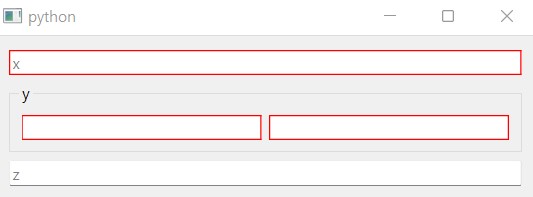
Widget with highlighted fields